
Job search questions
Why Am I Not Appearing in Recruiter Searches on LinkedIn?
Recruiter searches depend on the filters used. Here is how to make your LinkedIn profile clearer for the roles you want, without guessing at the algorithm.
By My Role Builder ·
If recruiters aren't finding you on LinkedIn, there may be a mismatch between the roles you want and the information their searches can use. A recruiter might filter for a current job title, a location, a skill, or a phrase in a profile. Another recruiter might use a different combination and see a different set of candidates. You can't know every search or guarantee that you'll appear in it, but you can make your experience easier to find and understand.
LinkedIn's Recruiter filter guide explains that job-title filters use titles in the Experience section, keyword filters use profile content, and skills filters draw on listed skills and relevant profile text. That gives you a practical place to start: compare your profile with the requirements of the roles you actually want.
What the search data tells us
In a 2024 analysis of its Recruiter search activity, LinkedIn reported that 13% of candidate searches included a skills filter. The analysis examined search activity across July 2022 to June 2024. The remaining 87% is the arithmetic complement, not a separate measurement of why recruiters searched or whom they found.
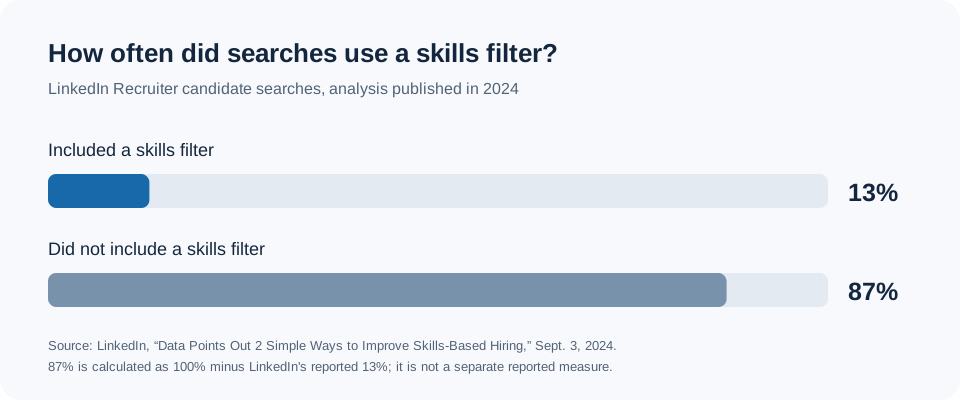
Chart source: LinkedIn's 2024 analysis of Recruiter search activity. The 87% bar is calculated as 100% minus LinkedIn's reported 13%.
That figure is a reminder to look beyond the Skills section. Recruiters can also narrow results with title, location, company, industry, keyword, and other filters. It doesn't mean skills are unimportant: LinkedIn says its skills search can recognize both skills you've listed and skills supported by wording elsewhere in your profile. The useful lesson is to make your role and capabilities clear in more than one place, using accurate language rather than repeating a keyword mechanically. Sources: LinkedIn's search-filter definitions and skills-filter explanation.
Start with the role you're trying to reach
Pick two or three real job descriptions for the same kind of role. Write down the titles, essential skills, industry terms, and locations they share. Then compare that short list with your LinkedIn profile. This is more useful than adding every fashionable phrase you see in a single posting.
Suppose you're aiming for a Customer Success Operations role. Your profile may describe strong work in renewal forecasting, CRM reporting, and process design, while your Experience section calls the job only “Operations Manager.” The work may be relevant, but a recruiter filtering by a specific current or past title could interpret the title differently. LinkedIn says its Job titles filter uses titles entered in Experience. Keep your actual title accurate. If the organization used a broad title, use the description below it to explain the function and its results in plain language.
Your headline can give readers immediate context, but changing only the headline won't rewrite your Experience titles. Treat the headline, Experience entries, and About section as one coherent account of the work you've done and the work you're seeking.
Show skills through the work, not just a list
Review the Skills section for capabilities you can genuinely demonstrate. Then check whether your About and Experience sections show where you used them. For example, “renewal forecasting” is more credible when an Experience entry explains the forecasting process you owned, the teams involved, and the decision it helped them make. Avoid inventing a metric to make the line sound stronger.
LinkedIn says Recruiter skill searches can use explicit skills, skill keywords in profile text, and inferred skills from experience. Its Boolean-search guidance also describes how recruiters combine terms with AND, OR, and NOT. That means a profile can be relevant to a role and still miss a narrow search if one required term is absent or a filter excludes it. Use the terminology employers use when it's an honest description of your work, including common abbreviations where they matter, but keep the sentences readable for a person.
Check location and Open to Work preferences
Location can change the candidate pool a recruiter sees. LinkedIn's Recruiter documentation says a location filter can target people in a region or people interested in relocating there. Check that your profile location reflects where you are, and that your job preferences reflect where you'd consider working.
If you use Open to Work, review the job titles, locations, workplace types, employment types, and visibility setting. LinkedIn says these are editable preferences and that specifying the opportunities and locations you want can help your profile appear when recruiters search for suitable candidates. Its Open to Work instructions also explain the difference between sharing your interest with all members and sharing it with Recruiter users only. The recruiters-only setting has privacy limits, so read LinkedIn's explanation before choosing it.
Open to Work is a signal of interest, not a substitute for relevant experience on the profile. Recruiters can use an Open to Work spotlight, but they can also search without it. Keep the rest of your profile clear whether or not you turn the signal on.
Don't confuse Google visibility with Recruiter visibility
If you search your name on Google and don't see your LinkedIn profile, check your public-profile settings. LinkedIn says those settings affect which sections can appear to people who aren't signed in and to external search engines. Its visibility guide treats LinkedIn search and off-LinkedIn search as separate settings. A Google result is therefore a poor test of whether a recruiter using LinkedIn Recruiter can find you.
A 20-minute profile audit
- Choose the target role. Gather two or three current job descriptions for the same role family and note the recurring titles, skills, and location requirements.
- Check Experience titles. Make sure each title is accurate, and use the description to explain relevant responsibilities when the title alone is broad.
- Check skill evidence. Add missing, truthful skills to the Skills section, and show how you used the important ones in Experience or About.
- Check preferences. Review your location and Open to Work settings against the places, workplace types, and roles you'd accept.
- Read it like a recruiter. In a quick scan, can someone tell what role you do, what you can do, and where you can work? Remove vague phrases that obscure those answers.
You can use My Role Builder to compare how your profile and resume describe your experience against target roles. The goal of this audit is a more accurate, understandable profile. No edit can promise a place in every search or guarantee a recruiter message.
Sources and chart note
- LinkedIn Recruiter and Recruiter Lite search filters and definitions
- LinkedIn Skills filter in Recruiter and Recruiter Lite
- LinkedIn Boolean search guidance
- LinkedIn Open to Work instructions
- LinkedIn profile visibility guidance
- LinkedIn's 2024 analysis of skills-based searches. The chart displays its reported 13% share and a calculated 87% complement. The figure describes Recruiter searches in LinkedIn's analysis, not the probability that any individual profile will appear.